
The AI Office-Automation Playbook
How we put proven copilots and cowork agents on the repetitive office grind — intake, document triage, form and invoice extraction, the status chase, first-draft replies — so owners and admins get their week back for growth. This is the outline, not the full engagement.
The highest-return AI work is rarely the flashy chatbot. It is the repetitive office load that quietly burns owner and admin hours every week: reading PDFs and re-keying them, chasing missing fields, drafting the same three email variants, moving items from the inbox into the system of record by hand.
This page is the generic version of how we attack that — the skeleton, the moves, and the guardrails. The proprietary part is the judgement: which workflows to pick first, the selection rubric, the exact prompts and controls, and the numbers we hold ourselves to. That is the engagement. What follows is enough to see the shape of it and decide whether to talk.
The problem, in plain terms
Owners and senior staff end up as the 'system of record' for admin. Headcount for pure admin is hard to justify, so the boring work lands on the most expensive people in the building — and the growth work (sales, delivery, hiring, expansion) is what slips, because the grind never stops.
The two easy answers both fail. Off-the-shelf RPA demos look cheap and break on the first exception. An ungoverned AI tab in a browser creates real risk — customer data in an unknown place, no audit trail, no owner — with none of the reliability. The useful path sits between them, and it is mostly design, not tooling.
The mechanism
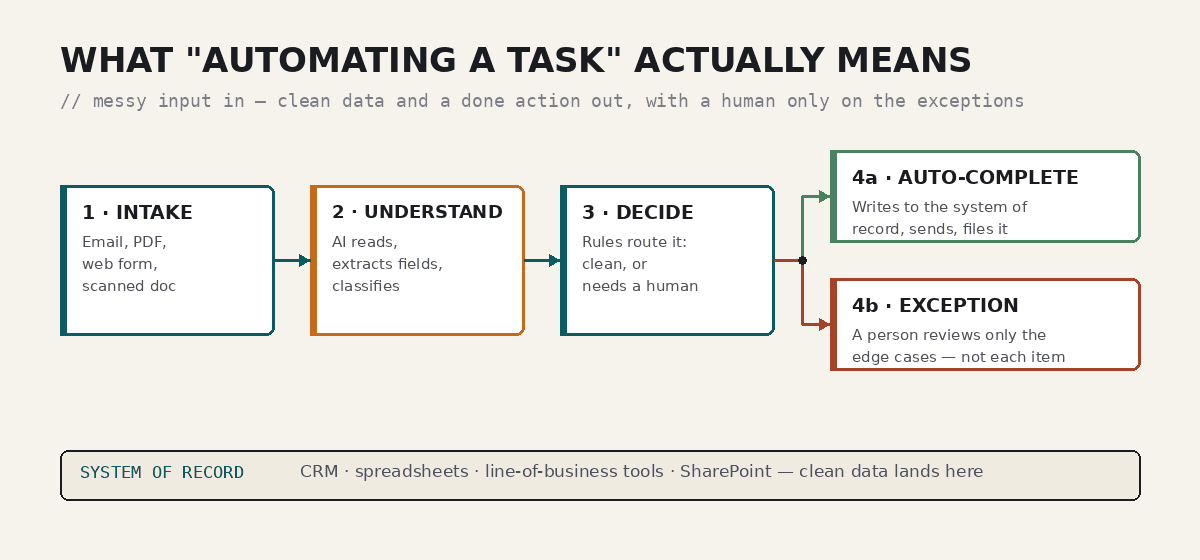
Every workflow we automate has the same shape. Messy input arrives — an email, a PDF, a web form, a scanned document. An AI layer reads it, extracts the fields that matter, and classifies it. Deterministic rules then decide: is this clean enough to complete automatically, or does it need a human? Clean items are written straight to the system of record, sent, or filed. The rest go to an exception queue where a person handles only the edge cases.
The important design choice is that the AI is never the only thing in control. The backbone is deterministic and auditable; the model does the genuinely fuzzy parts — reading unstructured input, classifying, drafting language — inside guardrails. That is the difference between a demo that dazzles and a system your team can rely on next quarter.
The engagement, six moves
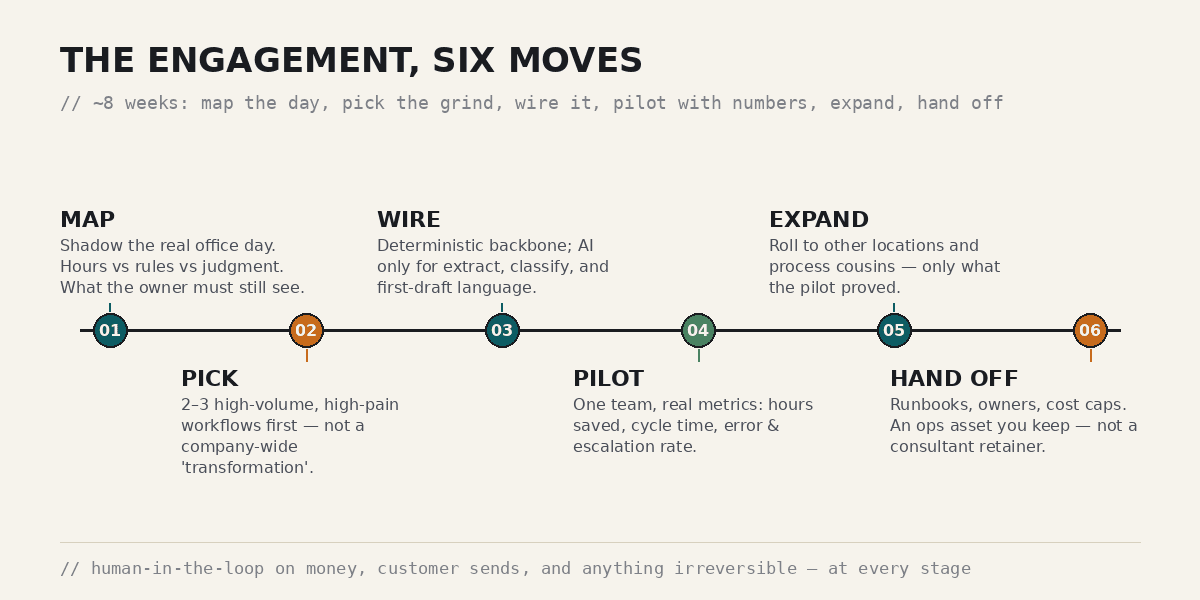
The stages are deliberately boring. The value is in how each is run — the selection rubric, the controls, and the metrics — which is the part we bring. Here is the outline.
Map the real office day
We shadow the actual work and separate it into three buckets: tasks that burn hours, tasks that are pure rules, and tasks that genuinely need human judgement — plus the short list the owner insists on seeing personally. This map, not a tool, decides everything downstream.
Pick the grind, not a 'transformation'
We start with two or three high-volume, high-pain workflows — an intake-to-system pipeline is the usual first win — rather than a company-wide AI programme. Narrow scope is what makes the pilot honest and the ROI legible.
Wire the backbone
A deterministic workflow engine and your existing connectors do the orchestration; the model is used only for extraction, classification, and first-draft language. We pick the right coworker per surface rather than forcing one model everywhere.
Pilot with real numbers
One team, live work, and a short list of metrics agreed up front: hours saved, cycle time, and error/escalation rate. If it does not move those numbers, it does not expand — and we say so.
Expand what proved out
Only the workflows the pilot actually validated roll to other locations and process cousins. Expansion follows evidence, not enthusiasm.
Hand off as an asset
Runbooks, named owners, and cost caps so the automation is something your team operates — not a permanent dependency on us. Optional fractional support after go-live, never required to keep the lights on.
What we automate — and what we deliberately don't
The line is the whole strategy. Automate the grind; keep humans on judgement, money, and relationships.
- Document and email intake → structured fields
- Invoice and form extraction (OCR + classification)
- Status chase and 'stuck in inbox' follow-ups
- First-draft replies for review, not auto-send
- Re-keying between tools and the system of record
- Recurring reports and data hygiene
- Anything that moves money — approved by a person
- Customer-facing sends the owner wants to see
- Irreversible actions (deletes, filings, commitments)
- Genuine judgement calls and exceptions
- The relationships and expansion work that grow the business
- Final say on anything the map flagged as owner-visible
How the steps earn the outcomes
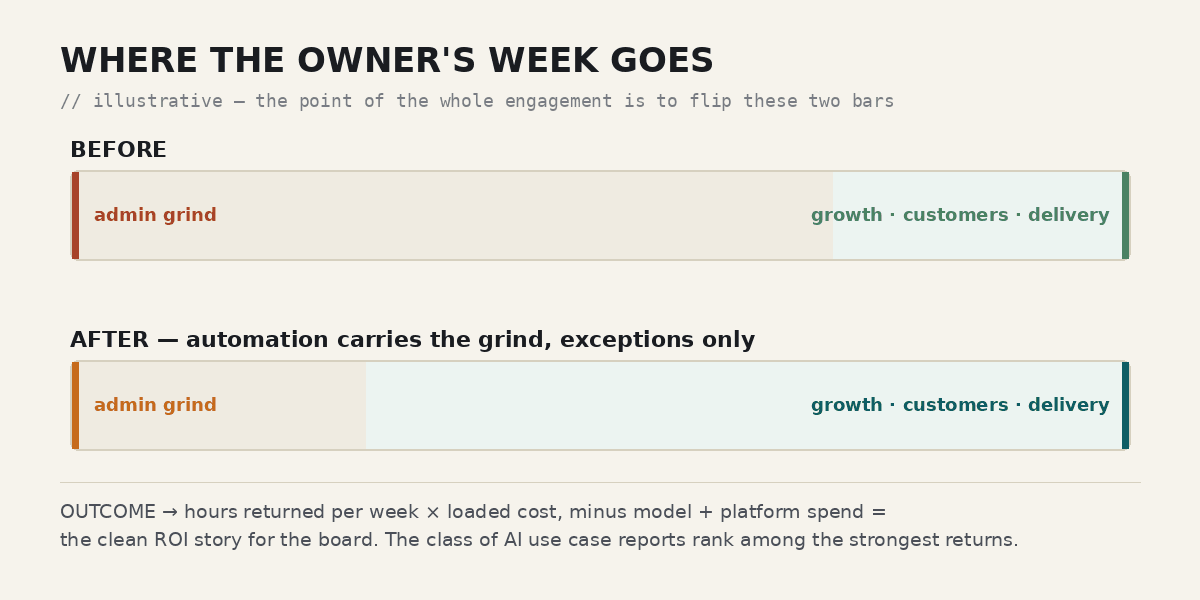
Reclaimed owner and admin hours come from moving the intake-to-system grind off people and onto the pipeline — the mapping step is what finds those hours, and the pilot is what proves they are real. Faster cycle time and cleaner data come from the deterministic backbone writing structured fields straight into your systems, instead of a person re-keying under time pressure.
The exception queue is what replaces silent failure: instead of every item being re-checked by hand, staff review only the genuine edge cases, and nothing falls through quietly. And the ROI story for the board is the arithmetic the metrics make possible — hours returned per week times loaded cost, minus model and platform spend — the class of AI use case that industry reports consistently rank among the strongest returns.
The guardrails that make it safe
Human-in-the-loop on money, customer-facing sends, and anything irreversible — always. A full audit of what the model proposed versus what actually shipped, so there is a record and an owner. Least-privilege access to tools and data, secrets in a proper vault, and cost caps with a kill switch so an automation can be paused without a war room. Identity and logging through your existing estate, not a founder's laptop.
None of this is exotic. It is the operations discipline that separates an automation you trust in production from a clever demo — and it is applied from the first pilot, not bolted on later.
What you actually get
By the end of a first engagement, you hold:
- A prioritized map of your office work — automate now, automate later, keep human
- Two or three live, governed workflows running on a pilot team
- A measured before/after: hours saved, cycle time, error and escalation rate
- Runbooks, named owners, cost caps, and audit logging
- An honest expand-or-stop recommendation backed by the pilot numbers
- A board-ready ROI summary in hours-and-dollars, not vibes
Common questions
Is our data safe with the AI?
That is the design, not an afterthought. Automations run under your identity and estate with least-privilege access, secrets in a vault, and a full audit trail. We do not put customer data into ungoverned tools, and human approval gates anything sensitive or irreversible.
Will this replace our admin staff?
The goal is to take the repetitive grind off expensive people so they — and the owner — spend time on customers, delivery, and growth. Staff move from re-doing every item to reviewing exceptions. It changes the work, not the headcount decision, which stays yours.
How fast do we see results?
A typical first engagement is roughly eight weeks: discovery, a pilot on two or three workflows, then a measured expand-or-stop decision. You see real numbers on a pilot team before anything scales.
What does it cost, and what is the return?
Scope depends on your workflows, so pricing is set in the SOW after a short discovery. The return is deliberately measurable: hours returned per week times loaded cost, minus model and platform spend. If the pilot does not clear that bar, we tell you.
Which AI tools do you use?
The right coworker per surface — Copilot inside a Microsoft 365 estate, Claude for long-document and multi-step desk work, others where they fit — on a deterministic backbone. We pick for fit, never force one model everywhere.
Which of these hours could you get back?
Send a brief of your most repetitive office work. We will tell you honestly which parts are automatable, which are not, and what a first pilot would cover.